Point a HomeKit camera at the dog’s crate and, since iOS 27, the Home app writes a sentence about every clip it records. You can then search those sentences in plain English. It is the closest thing Apple has built to a pet camera without selling one. On September 9, 2026 Apple published the catch. Apple Home camera video descriptions are capped by how much you pay for iCloud, and the entry price covers one camera. Recording stays unlimited on the same plan. The writing does not.
What the feature does
Apple’s own description is short. “With Apple Intelligence in the Home app, you can automatically generate video descriptions for recorded clips from compatible Home cameras. You can then search your recordings using natural language, and related notifications are grouped together so you get fewer alerts.”
Three separate things sit in that sentence. The Home app writes a description of what happened in a clip. You can then search the day in words instead of scrubbing a timeline. And repeated alerts get grouped, so eight notifications from one hour of a cat being a cat arrive as fewer interruptions.
You turn it on per camera. Open the Home app, tap the more button on the Home tab, tap Home Settings, turn on Apple Intelligence, then enable or disable video descriptions for each camera. Notification grouping is a separate switch under Home Settings, Apple Intelligence, Reduce Notifications.
The limit Apple added on September 9
Apple’s support note says these features are “available for a limited number of cameras depending on your iCloud+ plan”, and then lists the numbers: “up to 1 camera in the 2 TB plan, up to 2 cameras in the 6 TB plan, and up to 5 cameras in the 12 TB plan.” It adds that supported camera counts “may change over time.”
In the United States those plans cost $9.99, $29.99 and $59.99 a month. The 50 GB and 200 GB plans, at $0.99 and $2.99, get no descriptions at all.
Set that against what the same plans do for plain recording. The two rules do not match. Apple’s guide says the 50 GB plan records one camera and the 200 GB plan records up to five. The three larger plans all record “an unlimited number of cameras”, keeping the last ten days of activity. So a $9.99 subscriber can record four cameras and get a written description from exactly one of them.
Adding a second camera
A single camera on the cat’s room costs $9.99 a month for the descriptions, and that is the entry price. Add a second camera, on the kitchen or the crate, and the plan has to move to 6 TB at $29.99. The jump is $20 a month, or $240 a year, for one extra written summary.
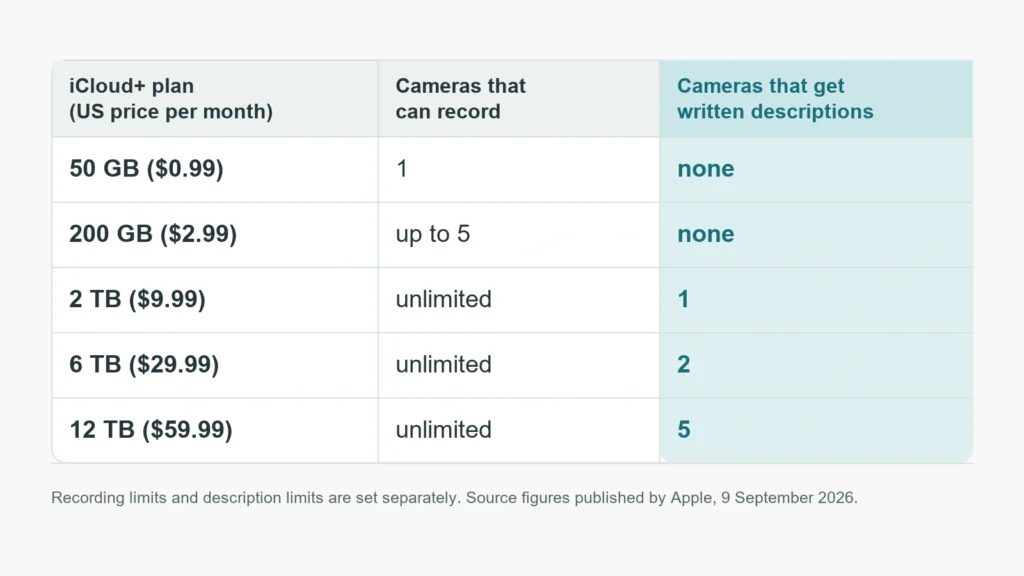
Five cameras means the 12 TB plan at $59.99. Storage is the thing being sold here, and storage is not what a pet owner is short of. Apple states that camera video “doesn’t count against your iCloud storage limit.” You are paying a storage price for a feature allowance.
What it can tell you about which pet
This is where the difference from a dedicated pet camera shows. HomeKit Secure Video sorts motion into people, animals, vehicles and packages, and you can record or be notified on any of those. Apple’s face recognition works on people you have tagged in the Photos app. Nothing in the Home app identifies an individual cat or dog.
In a one-pet household that hardly matters. With three cats it matters a lot. The question people have is which one stopped eating, and a summary saying an animal approached the bowl at 14:12 does not answer it. Kit built for that job takes a different route. The PetKit YumShare Solo 2 feeder with camera recognizes up to fifteen pets by face and logs every visit with a timestamp and a duration. Apple gives you better video and no identity. A feeder camera gives you identity and a fixed view of one bowl.
Hardware and plan requirements
The requirements are not trivial. You need a home hub, which Apple lists as a HomePod second generation, a HomePod mini, or an Apple TV 4K running the latest software. The owner of the home needs an Apple Intelligence capable iPhone. For iOS 27 Apple defines that as an iPhone 15 Pro, an iPhone 15 Pro Max, or an iPhone 16 or later. Apple Intelligence has to be switched on in the Home app. And the 2 TB plan is the floor.
There is a regional catch too. Apple states that “Apple Intelligence is not available in all languages or regions”, and the supported language list runs to sixteen entries. If your phone’s Siri and device language sit outside that list, the descriptions are not coming.
The privacy part is the strongest part
On recording, Apple’s position is clear and unusually good. Footage from a HomeKit Secure Video camera is analyzed and encrypted on your home hub, the Apple TV or HomePod sitting in your house, and only then uploaded to iCloud. The company you bought the camera from does not hold a copy.
What Apple does not say on these support pages is where the written description itself is generated, on the hub or on Apple’s servers. That distinction matters to anyone who put a camera in a bedroom, and it is worth asking before switching the feature on for every camera in the house.
Worth it for a pet, or not
For one animal and one camera, $9.99 a month buys a searchable day and fewer notifications. You also get iCloud storage you may want anyway. That is a reasonable deal, and the encryption model beats most pet camera clouds.
At two cameras the maths turns. Paying $240 more a year for a second written summary is hard to defend when the same money buys a purpose built pet camera or feeder outright. Start with the room that matters most, run it for a month, and only move up a tier if you find yourself searching the timeline rather than watching it.