If a TP-Link Tapo C200 or Tapo C120 watches your dog or cat while you are out, it needs a firmware check. On September 15, 2026 the security firm OPSWAT published two flaws it found in the C200. The serious one, a Tapo C200 vulnerability rated 8.7 out of 10, lets anyone on your home network take an administrator session on the camera without knowing the password. TP-Link has fixed both. The catch is that its advisory names one hardware version of each camera, and the C200 has been sold in several. A third flaw, which OPSWAT says could let an attacker take over the camera completely, is still waiting for a patch with no date.
What the two flaws allow
The first, CVE-2026-15315, sits in the way the camera checks a login. The camera sends a challenge and expects an answer that only someone with the password could produce. OPSWAT found a second path through the same check where a value the camera itself hands out can be sent back and accepted. With that, an attacker gets full admin rights to the camera’s settings. OPSWAT says this can also expose the live video and stored recordings. It affects the C200 and the C120.
The second, CVE-2026-15316, rated 7.1, crashes the camera’s management service when it receives an oversized block of encrypted Wi-Fi setup data. The service comes back on its own, but until it does you may not be able to reach the camera. Only the C200 is affected.
Both need the attacker to be on the same local network as the camera. Neither needs a password or any action from you.
The timeline explains why this is news now rather than in spring. OPSWAT reported the flaws on April 16. TP-Link confirmed them on July 10 and released the fixed C200 firmware on August 18. OPSWAT published its findings on September 15, and TechRadar’s report on September 23, which noted that Amazon sells the C200 as a baby monitor and pet camera, brought them to a wider audience. The fix is more than five weeks old. Whether your camera has it depends on whether it has updated since.
The hardware version on your camera may not match the advisory
TP-Link’s advisory lists two cameras and two fixed builds.
| Camera | Hardware version in the advisory | Fixed firmware |
|---|---|---|
| Tapo C200 | V5 | V5_1.4.6 Build 260709 Rel.27675n |
| Tapo C120 | V1 | 1.9.3 Build 260521 |
That looks simple until you open TP-Link’s US download page for the C200. It lists eight hardware versions: V3, V3.20, V3.26, V3.60, V3.80, V5, V5.46 and V5.60. The advisory names V5 and says nothing about the rest. It does not say whether the V5.46 and V5.60 revisions count as V5, or whether the older V3 cameras share the flawed login code.
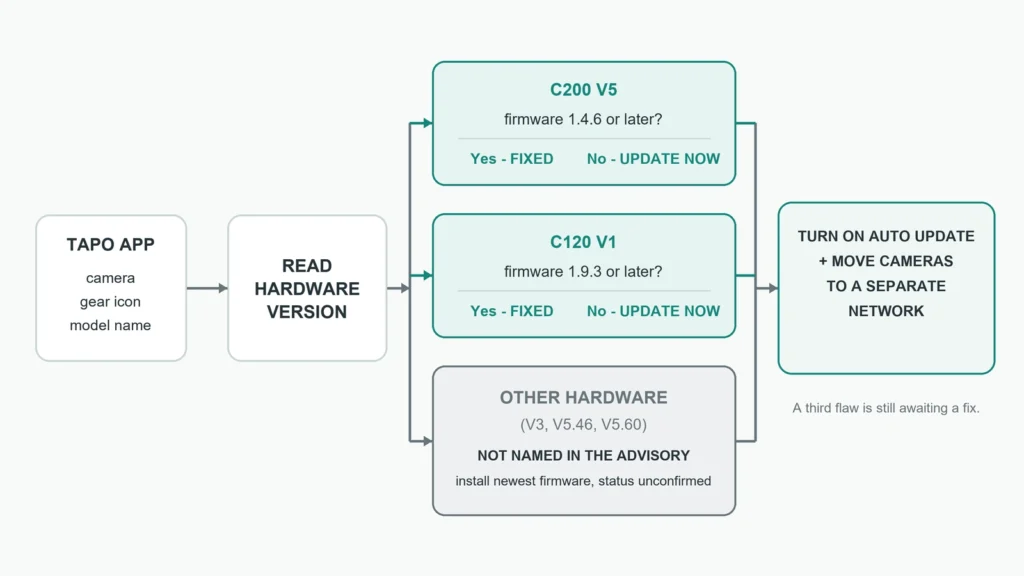
So the version printed in the app matters. In the Tapo app, open the camera, tap the gear icon, then tap the camera’s model name. The page shows the hardware version and the firmware version side by side.
If the hardware says V5 and the firmware reads 1.4.6 or later, you have the fix. A C120 needs 1.9.3. Every other hardware version is a question TP-Link has left open, so install the newest firmware the app offers and check again when the next advisory appears. The company has not said those cameras are affected, and it has not said they are safe.
Updating, and leaving it switched on
TP-Link updates Tapo cameras only through the Tapo app. Open the camera, tap the gear icon and choose Firmware Update, or go to Me and then Firmware Update to check every device at once. The same screen has an Auto Update switch on models that support it, and TP-Link says support varies by model. Do not unplug the camera while it installs.
Auto Update is the setting that matters most here. The third flaw will be fixed with another firmware release, and neither OPSWAT nor TP-Link has given a date. A camera set to update itself gets that fix without you having to read about it.
Why a local-network flaw still matters in a pet home
“Local network” sounds like a high bar. In most homes it means everything on the Wi-Fi: phones, a smart TV, a feeder, a robot vacuum, and any guest who was given the password. One compromised device is enough, which is why our look at what a smart TV finds when it scans your network matters more after an advisory like this one.
OPSWAT’s warning about the unpublished flaw goes further. It says a fully compromised camera could become a foothold for reaching other devices on the network. That is the argument for a guest or separate smart home network, if your router offers one. Put the cameras and the other pet gear there, and keep laptops and phones on the main network.
The same check applies to every lens in a pet setup. A feeder with a camera, such as the PETKIT YumShare Solo 2, sits on the same Wi-Fi and deserves the same look at its firmware and update settings.
This case is also better news than the last pet camera advisory we covered. The seven CareCam flaws had no patch and a vendor that did not reply. TP-Link fixed these, and the researchers say they are still working with it on the rest.
Keep it or replace it
A C200 with hardware V5 and firmware 1.4.6 or later is a reasonable pet camera to keep, especially once it sits on a separate network with Auto Update switched on. The same goes for a C120 on 1.9.3. The case for replacing one rests on the older hardware versions. If a V3 camera still shows no update by the time OPSWAT publishes the third flaw, that is the point to retire it.