A United States government advisory published on September 15, 2026 describes seven separate security flaws in one model of budget Wi-Fi camera, and the vendor has not replied to the agency at all. One of the flaws lets anyone on the same network pull the live video feed without a password. If you keep a cheap indoor camera pointed at a dog crate or a litter box, this pet camera security advisory is worth ten minutes of your evening. It explains exactly what was found, what remains unfixed, and which checks reduce your exposure.
What was published, and on which dates
The advisory carries the reference ICSA-26-258-08 and the title CareCam CM2507. It was released on September 15, 2026 and names a single affected product: CareCam HMT.CM2507 firmware version v251211.1507. The seven individual vulnerability records were published three days later, on September 18, 2026.
A separate advisory, ICSA-26-251-01, appeared a week earlier on September 8, 2026 and covered CareCam Pro IP cameras. That one names the model ANJIA AJL33PC0801 and a hard-coded bootloader credential, scored 6.8 under CVSS version 3.1 and 7.0 under version 4.0. It needs physical access to the device, so it matters far less than what followed.
The agency lists the affected cameras as deployed worldwide, with the company headquartered in China. It also states that no public exploitation of these specific flaws has been reported to it.
The seven flaws, and what each one allows
Scores below are the published CVSS version 3.1 and version 4.0 base scores. The descriptions come from the vulnerability records themselves.
| Reference | What it allows | v3.1 | v4.0 |
|---|---|---|---|
| CVE-2026-85497 | Root password stored as a weak legacy hash, crackable offline, possibly reused across other cameras on the same firmware | 9.8 | 9.3 |
| CVE-2026-81321 | Wi-Fi network credentials stored in cleartext in the device filesystem | 9.8 | 9.3 |
| CVE-2026-88259 | Live video stream reachable over the network with no authentication at all | 7.5 | 8.7 |
| CVE-2026-84398 | A privileged ONVIF management account accepts an empty password | 7.5 | 8.7 |
| CVE-2026-81305 | Runs a script from removable media automatically, without checking it | 6.8 | 7.0 |
| CVE-2026-85478 | Bootloader exposed through a physical debug interface, no authentication | 3.5 | 2.4 |
| CVE-2026-84400 | A maintenance mechanism can switch on a remote debugging service | 3.1 | 2.3 |
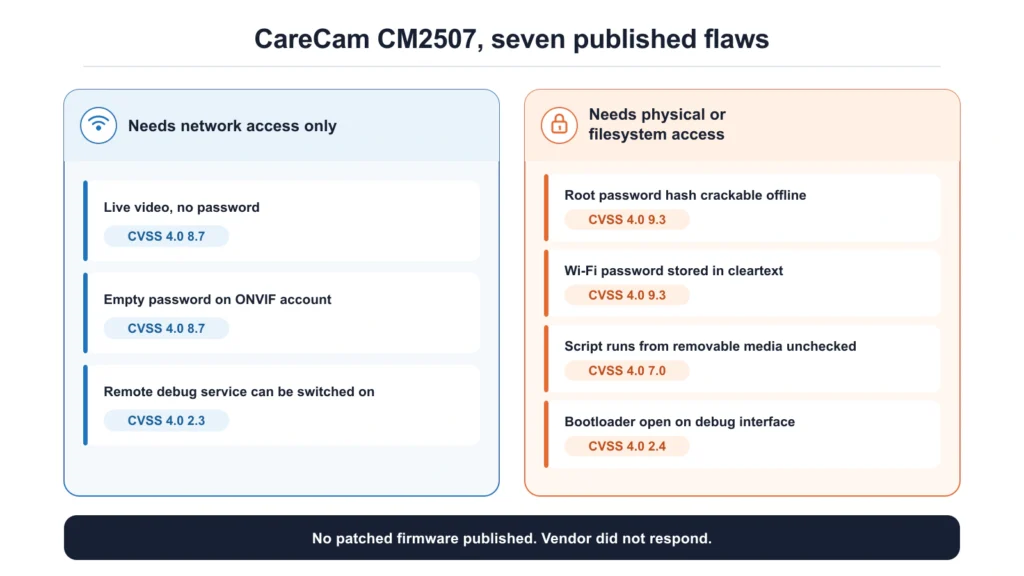
Read past the scores and a pattern appears. Three of the seven need physical hands on the device. Three others need only network access. The video-stream flaw matters most in a pet home, because it means a person already on your home network can watch what the camera watches, with nothing to defeat.
The two highest-scored entries deserve a caveat that the numbers alone hide. The cleartext Wi-Fi credential flaw scores 9.8, yet its own description says an attacker needs filesystem access first, obtained through physical access, a debugging interface, or another vulnerability. Its severity reflects the damage if it is reached, not the ease of reaching it. That distinction gets lost in most coverage.
Why the missing patch is the real story
Security advisories normally arrive with a fixed firmware version attached. This one does not. The advisory states that CareCam has not responded to the agency’s attempts to coordinate, and it tells owners to contact CareCam themselves. No patched firmware is named for any of the seven entries.
That changes the calculation for an owner. With a responsive vendor, the answer is to update and move on. Here there is nothing to install, so the only remaining controls are the ones you apply around the camera. The agency’s own guidance says to keep such devices off the public internet, put them behind a firewall, separate them from your main network, and use a VPN for any remote access you need.
What this does and does not tell you about pet cameras
Be careful about the leap from one advisory to a general claim. The documents cover CareCam-branded cameras running one firmware build. They do not name pet cameras as a category, and they do not say what share of these units are sold specifically for watching animals. Cheap indoor Wi-Fi cameras get bought for babies, front doors, holiday homes and pets alike, often under rotating brand names on marketplaces.
What does carry across is the failure pattern. An unauthenticated video service, an empty password on a management interface and a shared root hash are not exotic bugs. They are the standard shortcuts of low-cost camera firmware, and they show up repeatedly across the budget end of the market.
How to check your own setup this week
Start with identification. Open the app you use for the camera and look for a model string and a firmware version in the device settings. Compare that firmware string against v251211.1507. If your camera pairs through an app called CareCam or CareCam Pro, treat it as in scope until you can show otherwise.
Then work through the exposure, whatever brand you own:
- Turn off any port forwarding or UPnP rule that exposes the camera to the internet.
- Move cameras onto a guest or IoT network so a compromised camera cannot see your laptop or your network storage.
- Change the Wi-Fi password if a camera with the cleartext storage flaw has ever been on your network, because that credential may already be recoverable from the device.
- Replace default account passwords in the app and check whether any management account has a blank one.
- Point the camera at the space you need and nothing more.
The same questions apply to feeders and litter boxes
Cameras no longer live only in camera products. Plenty of smart feeders now carry one, and they sit on the same home network with the same exposure. Our specification page for the PetKit YumShare Solo 2 feeder with camera covers a feeder built around exactly that combination, including a detail worth remembering here: its battery backup deliberately shuts the camera off during a power cut.
Ask the same three questions of any pet device with a lens. Does the vendor publish firmware updates and a security contact. Does the device need an internet-facing port to work. Can you put it on a separate network without breaking the app. A brand that answers all three well is worth paying a little more for, and an unanswered advisory is a strong argument for not buying again.