Furbo Mini 360 Review: The Pet Camera You Cannot Switch On Without Paying
The Furbo Mini 360 is a compact, rotating 2K camera with a bamboo lid, a treat tosser and two-way audio, built to sit on a table. It also carries a warning in its own Amazon listing title that most products would bury in the small print: a paid plan is required to activate it.
That is the fact this review is organized around, because it changes what you are buying. Nobody on this site has set one up. Every specification comes from Furbo's own product page or its support documentation, and the subscription mechanics come from Furbo's own help center article on subscription-required cameras. If you want the wider picture on recurring fees in this category first, our breakdown of what pet tech subscriptions cost over three years is the right starting point.
Affiliate disclosure: the price links on this page may earn us a commission at no extra cost to you. Retailers cannot pay for placement or influence the score. How we stay independent
RecommendationConsider if you accept an ongoing Furbo Nanny plan, since Live View stays locked until one is activatedEvidence: maker figures only · Specification score on the product page
A well-judged little camera wrapped around a commercial model that decides the review. The hardware is good for the size, and the rotating 2K view with auto tracking does the job a pet owner wants. What you need to understand before buying is that Live View stays locked until you activate a Furbo Nanny plan, and the plan does not stop when the first year does.
Strengths
2K resolution with 8x zoom, better than Furbo's own larger 1080p cameras
Rotating 360 degree view with auto tracking, in a body under 4 inches tall
Color night vision using light in colors a pet can see
Weaknesses
Live View stays locked until a Furbo Nanny plan is activated during setup
Hardware price is part of a bundled service arrangement
No power adapter in the box, despite a specific power requirement
Research-based: assessed from the manufacturer’s published specifications, documentation and the independent sources listed at the end. We have not tested this unit ourselves; any measurement quoted belongs to the cited source.
Method
Hardware specifications were read from Furbo's United States product page, including the comparison table that sets the Mini 360 against the Furbo Mini and the Furbo 360 cameras. Setup requirements, box contents and the treat guide were read from Furbo's own quick start guide for this model. The subscription mechanics come from Furbo's help center article explaining how subscription-required cameras activate, which is the clearest published description of the model. Sections are scored on what the documented behavior does for a pet owner, and the subscription is weighted most heavily because it is the part of this product that cannot be avoided.
Evidence
Furbo publishes the dimensions, the camera resolution, the zoom, the tracking behavior and the treat capacity for this model, and its quick start guide adds the power requirement and the placement guidance. The most important source is Furbo's own support article on subscription-required cameras, which states in plain terms that Live View remains locked until activation, that these cameras are sold as bundled hardware and service at a lower upfront hardware cost, and that each new camera must complete its own activation before it can be used. Amazon's listing title carries the same warning.
Limitations
Nobody on this site has set up or used this camera. Image quality in a real room, the reliability of the auto tracking, how far the treat travels and how often the barking alert fires incorrectly are all unverified, and no section is scored on them. No independent laboratory or long-term test of this model was found. Furbo does not publish the weight, the lens field of view, whether the camera tilts as well as rotates, or whether it supports 5 GHz Wi-Fi, and none of those was assumed. Subscription prices and promotional hardware pricing change frequently and are deliberately kept out of this text. They belong in the offers block.
The hardware, and the thing that is not in the box
Not rated · Evidence: maker figures only
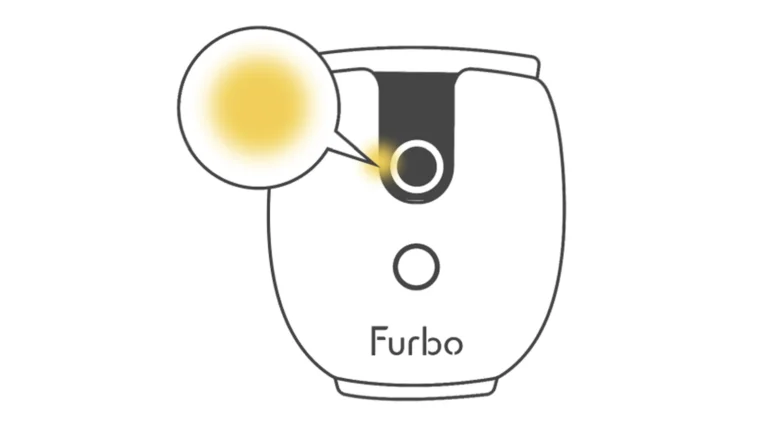
Setup diagram from Furbo's own quick start guide. The yellow blinking status light means the camera has started and is waiting to be paired. Furbo support documentation
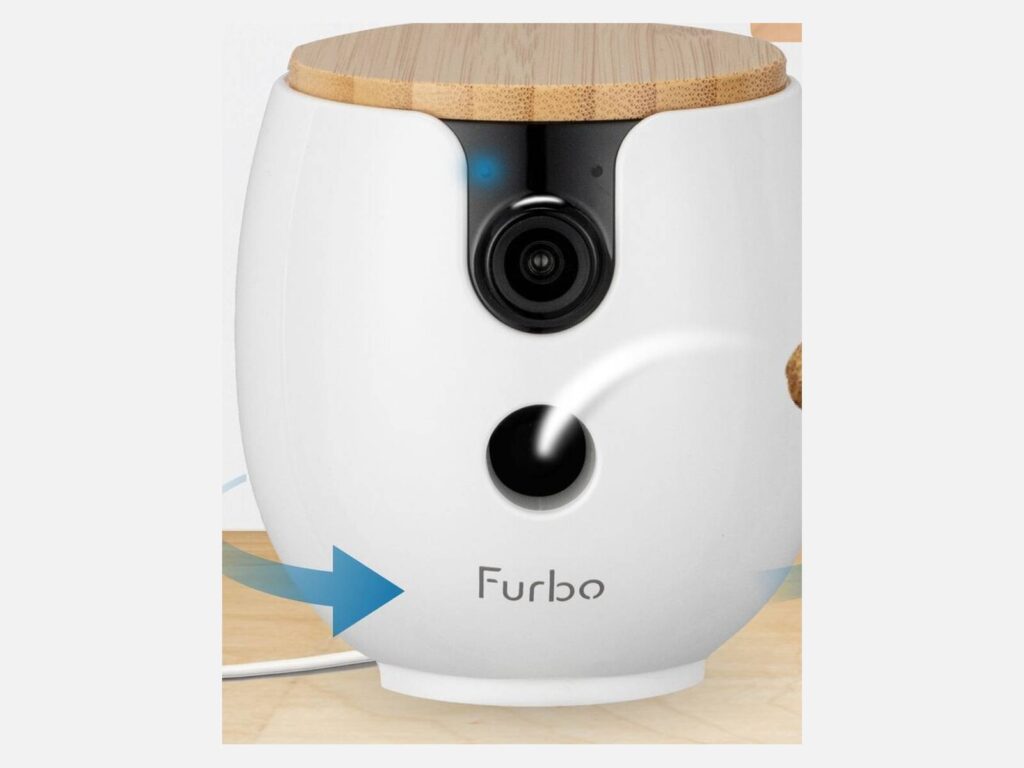
The Mini 360 measures 3.6 by 3.5 by 3.5 inches, which is roughly 91 by 89 by 89 mm. That is small enough to sit on a bookshelf without announcing itself, and Furbo's own comparison makes the point: the full-size Furbo 360 is 8.8 by 4.9 by 4.9 inches, so the Mini is less than half the height.
The body is rounded and white with a magnetic natural bamboo lid, which is the treat hopper cover. Furbo's quick start guide lists the parts: the bamboo lid, a status indicator, a speaker, the treat tosser, a 2K QHD camera with automatic night vision, a microphone, the 360 degree rotating view and a 6 foot USB-C cable.
Read that list again, because of what is missing from it. Furbo ships a USB-C cable and no power adapter. The guide states that the adapter is not included in the box and specifies what you need: 5 V output, more than 2 A of current and a minimum of 10 W. A spare phone charger may meet this, but a weak one will not, and starting a camera setup by hunting for a compliant adapter is a poor first ten minutes.
Placement matters more than on a wall-mounted camera. Furbo recommends 1.5 to 4 feet off the ground for maximum coverage and full rotation, and suggests moving the camera within 15 feet of the router if setup will not connect. A camera that rotates needs clear space around it, so a crowded shelf will limit what the 360 degree view is worth.
The status indicator is the main feedback channel during setup. A yellow blinking light means the camera has started and is waiting to be paired, and Furbo asks for 5 to 10 seconds before that appears.
Treat tossing, and the treats it will actually throw
Not rated · Evidence: maker figures only
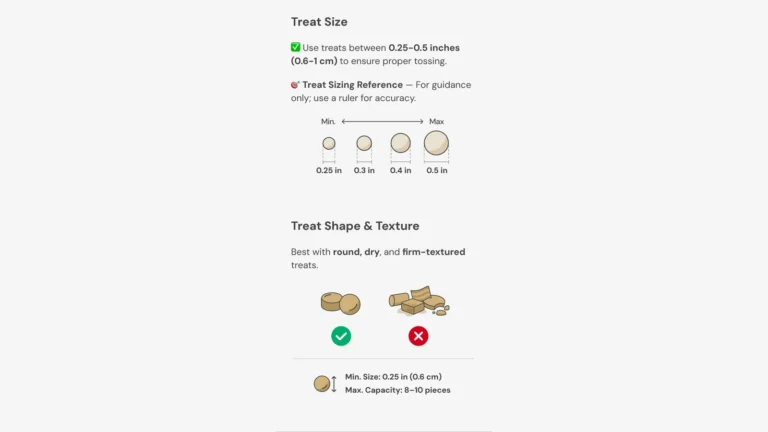
Furbo's own treat guide from the quick start documentation. The size window, the shape requirement and the 8 to 10 piece capacity are all the manufacturer's published figures. Furbo support documentation
Furbo calls this Lite Treat Toss, and the word lite is doing real work. The comparison table on Furbo's own site separates the Mini 360's Lite Treat Toss from the full Furbo 360's Fun Treat Tossing, so this is a reduced version of the feature by the manufacturer's own description.
The practical limits are published in the quick start guide and they are narrow. Treats must be between 0.25 and 0.5 inches, which is 0.6 to 1 cm. They should be round, dry and firm in texture. Soft, crumbly or irregular treats are shown as unsuitable. The hopper holds 8 to 10 pieces.
Think about what that means over a working day. Eight to ten small, round, dry treats is a handful. If your plan is to reward a dog several times across an eight-hour absence, you will run out, and the hopper cannot be refilled remotely. Treats also go in vertically, one at a time.
The feature is best understood as a way to get your pet's attention and reward one specific moment, not as a feeding mechanism. Used that way it is useful, because a camera that can make a dog come and look at it is a far better behavioral tool than one that can only watch.
One thing worth checking against your own cupboard before buying: the treats you already use probably do not match the size and shape specification, so budget for a compatible training treat as part of the purchase.
The camera, the app and what the alerts actually do
Not rated · Evidence: maker figures only
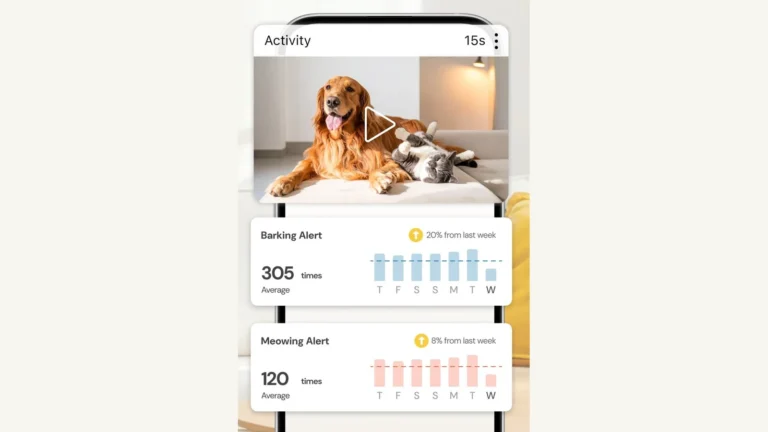
Furbo app screen published by Furbo. The counts shown are Furbo's own sample data. Furbo app screenshot published by Furbo
The camera is 2K QHD with a rotating 360 degree view and 8 times digital zoom, which puts it ahead of the Furbo Mini and the full-size Furbo 360 cameras, both of which Furbo lists at 1080p with 4 times zoom. For a device this small that is a real specification advantage, and 2K matters more on a rotating camera than on a fixed one, because digital zoom eats resolution and you start with more of it.
Auto tracking is the feature that makes the rotation worth having. Furbo describes the Mini 360 as automatically rotating and zooming in to follow your pet. Night vision is automatic, and Furbo describes it as color night vision using light in colors a pet can see, which is a sensible design decision for a device that lives in a room where an animal sleeps.
Two-way audio is real-time, and the built-in alerts cover barking and meowing. Here is the important boundary: Furbo's comparison table states that the barking or meowing alert is included, and that you subscribe to Furbo Nanny for more alerts. So the free alert set is narrow, and behavior detection, activity summaries and video history sit behind the plan.
What the app shows with a plan running is an activity feed with short clips, plus weekly counts for barking and meowing measured against your own recent average. That framing is a good idea. A raw number of barks means nothing. A number of barks compared with last week is the beginning of a useful signal about whether something has changed for your animal.
One limitation: alert counts are a detection system's opinion. Furbo publishes no accuracy figure for barking or meowing detection, and none was found elsewhere. Treat the trend as more reliable than any single day's number.
The subscription you cannot skip, and what happens if you stop
Not rated · Evidence: maker figures only
This is the section that should decide the purchase, and Furbo deserves credit for documenting it clearly even though it does not flatter the product.
Furbo's help center draws a line between two kinds of camera it sells. A subscription-optional Furbo works with or without a Furbo Nanny plan, and Live View works immediately. A subscription-required Furbo is different: it requires Furbo Nanny activation during setup, it is sold at a lower hardware cost with bundled service, and in Furbo's own words Live View remains locked until activation. Amazon's listing title for this camera states the same thing, which is how you can tell which kind you are buying before it arrives.
Two consequences follow, and neither is obvious from the product page.
The first is that the low hardware price is not a discount, it is a deposit. Furbo says these cameras are sold as bundled hardware and service packages at a lower upfront hardware cost. You are paying less now because you have committed to paying later, and the plan Furbo offers alongside the camera is billed as a year at a time.
The second catches existing Furbo owners. Furbo states that each subscription-required camera must complete its own activation during initial setup, even if you already hold an active Furbo Nanny plan, because the activation creates the service link for the new camera. After that activation completes, Furbo automatically detects the existing plan and merges them into one subscription, keeping your remaining value and putting all eligible cameras on a single renewal date. That is a reasonable outcome, but you have to go through the activation first, and a second-camera buyer who does not expect a second subscription screen will be confused by it.
The question nobody should skip is what the camera keeps doing if you stop paying. Furbo's published material describes what activation unlocks. It does not state what remains available if a plan lapses on a subscription-required model. Anyone buying on the strength of a promotional first year should ask Furbo directly before committing.
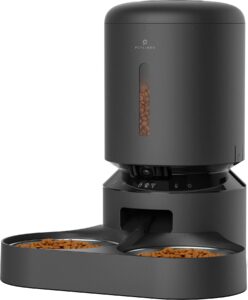
A different answer to the same problem. It combines a camera with a real feeder, so the food side is a genuine meal rather than 8 to 10 training treats, at the cost of a fixed view.
PetKit YumShare Dual-hopper 2 Automatic Feeder with Camera
The two-hopper version, worth considering in a two-pet household where you also want to watch feeding rather than just schedule it.
Specifications
Where to buy
In-stock offers for this exact model, sorted by item price in USD. Shipping is not included unless a retailer supplies it. Not every retailer is listed. Prices last checked 6 hours ago.
Prices and availability come from retailer feeds and change without notice; the retailer’s page is authoritative. We may earn a commission if you buy through these links.
✓
Final verdict
Furbo Mini 360
RecommendationConsider if you accept an ongoing Furbo Nanny plan, since Live View stays locked until one is activated
This review gives no score out of 10, because no section rests on a measurement by an independent body. The recommendation and the written verdict stand on their own.
Pros
2K resolution with 8x zoom, better than Furbo's own larger 1080p cameras
Rotating 360 degree view with auto tracking, in a body under 4 inches tall
Color night vision using light in colors a pet can see
Alert counts shown against your own recent average
Magnetic bamboo lid, shelf-friendly shape
Furbo documents the subscription mechanics openly in its own help center and merges duplicate subscriptions into one
Cons
Live View stays locked until a Furbo Nanny plan is activated during setup
Hardware price is part of a bundled service arrangement
No power adapter in the box, despite a specific power requirement
8 to 10 treats, no remote refill
Treats must be 0.25 to 0.5 in, round, dry and firm, which rules out many common treats
Furbo does not publish what a subscription-required camera retains if the plan lapses
No published weight, field of view or 5 GHz support
Conclusion
The Furbo Mini 360 is a good small camera attached to a commercial decision that takes effect at setup.
The hardware is the strongest part. A 2K sensor with 8 times zoom in a body under four inches tall beats Furbo's own larger cameras on paper, the rotation with auto tracking suits a tabletop device, and the app's habit of showing alert counts against your own baseline is a better idea than a raw number.
The treat tosser is a lighter feature than the name suggests, limited to 8 to 10 small round treats. The absent power adapter is a needless irritation. And the subscription is a precondition, with Live View locked until activation and a hardware price that Furbo itself describes as a bundled service arrangement.
The camera and app carry the score. The subscription model, which is weighted most heavily because it is the part you cannot avoid, holds it down. Buy it knowing what the plan costs over three years, beyond the promotional first one.
Our take
There is an honest version of the subscription-required model and a dishonest one, and Furbo is mostly doing the honest version. The help center article that explains all of this is unusually direct, the retail listing title warns you before you buy, and merging a duplicate plan into one is the fair outcome. What still sits badly is the framing. A camera whose Live View is locked until you activate a plan is not a camera you own with an optional service. It is a service with hardware attached, and the low sticker price is the clearest evidence of that. Owners who understand the arrangement and want a second Furbo in another room are well served here. Anyone drawn in by a low hardware price and expecting a camera that works with no plan should read the listing title twice. An assessment with no setup time cannot tell you how well the tracking follows a fast dog or how often the barking alert fires at a doorbell, and this one does not pretend to.
Best for
Owners who want a shelf camera to see and speak to a pet
Homes where a rotating view matters more than a fixed wide angle
People who will read the behavior trends
Anyone who already pays for Furbo Nanny and wants a second camera in another room
Dogs and cats that respond to a small reward as a way of being called to the camera
Consider an alternative if
You want a camera that works on its own, without a recurring plan
Treats need to last a whole working day
Your treats are soft, crumbly or irregular
Your plan is a wall mount
You are not prepared to ask Furbo what happens when a plan lapses before you buy
Does the Furbo Mini 360 work without a subscription?
No. Furbo classifies it as a subscription-required camera, and its help center states that Live View remains locked until a Furbo Nanny plan is activated during setup.
Is a power adapter included?
No. Furbo supplies a 6 foot USB-C cable only. The quick start guide specifies an adapter with 5 V output, more than 2 A of current and a minimum of 10 W, and states that it is not in the box.
How many treats does it hold?
Furbo states a capacity of 8 to 10 pieces. Treats must be 0.25 to 0.5 inches, which is 0.6 to 1 cm, and round, dry and firm in texture.
What happens if I already have a Furbo Nanny subscription?
You still have to complete a new activation for this camera during setup. Furbo then detects your existing plan and merges the two, preserving your remaining value and putting all eligible cameras on one renewal date.
Does the camera tilt as well as rotate?
Furbo describes a rotating 360 degree view and auto tracking that rotates and zooms. It does not state that the camera tilts vertically.
Is it better than the full-size Furbo 360?
On camera specification, yes. Furbo lists the Mini 360 at 2K with 8x zoom against 1080p with 4x zoom on the larger cameras. The full-size model has Fun Treat Tossing in place of the lite version and can be wall mounted.
Andreea reads PetTechScout’s articles, guides and reviews before they are published. When she has also checked a piece against its sources, the note at the end of it says so, with her name and the date.
This is a research-based assessment: the reviewer compiled it from published specifications, documentation and independent measurements rather than from testing the unit.
We keep cookies to a minimum. Without your consent, this site sets only the ones it needs to work: remembering your answer here and keeping the site secure. If you allow analytics cookies, Google Analytics counts visits and shows us which pages people read. If you allow functional cookies, two optional features can use them: Google sign-in for posting a review, and remembering embedded videos you choose to always show. The site is also set up for Google AdSense ads; the cookie policy explains how Google uses cookies once ads run. Cookie policy
Customise consent preferences
Each category below lists the exact cookies behind it, what they do and how long they last. Strictly necessary cookies cannot be switched off because the site would stop working without them. Anything else is yours to decline.
NecessaryAlways active
Strictly necessary cookies keep the site working and secure: they remember your choice here, help the security layer stop attacks and keep site accounts signed in to the admin area. The site cannot run without them.
Show the cookies in this category (10)
cmp_consent
PetTechScout · 1 year
Remembers your consent choice for each cookie category, so the banner does not ask again on every page.
cmp_visitor
PetTechScout · Session (until you close the browser)
Marks your browser as a real visitor, so a comparison page is built when someone actually opens one rather than when a crawler passes through. It holds the value 1 and nothing else: no identifier, no history.
__cf_bm
Cloudflare · 30 minutes
Tells automated traffic from real visitors at the security layer that sits in front of this site. It holds a bot score, not an identity, and is not used for advertising.
cf_clearance
Cloudflare · Set by Cloudflare (typically 30 minutes)
Records that your browser passed a security check, so you are not challenged again on every page. Set only if a check was shown to you.
wp-settings-(id), wp-settings-time-(id)
WordPress · 1 year
Remembers layout preferences inside the WordPress admin screens. Set only for accounts that sign in to run the site, never for ordinary visitors.
WordPress · Session, or 14 days if “Remember me” is ticked
Keeps a site account signed in to the WordPress admin, and checks that the browser accepts cookies at login. Set only for accounts that sign in to run the site, never for ordinary visitors.
wfwaf-authcookie-(hash)
Wordfence (Defiant, Inc.) · 12 hours
Lets the Wordfence firewall check a signed-in user’s access level before WordPress loads, so administrators are not blocked by firewall rules. Set only when you log in to the site.
wf_loginalerted_(hash)
Wordfence (Defiant, Inc.) · Persistent
Records that the administrator has already been alerted about a sign-in from this device. Only used if login alerts are enabled, and set only when you log in to the site.
wfCBLBypass
Wordfence (Defiant, Inc.) · Only if enabled
Allows a visitor who knows a hidden bypass address to pass country blocking. It is only used if country blocking is enabled, and we do not currently use it.
wfls-remembered-(hash)
Wordfence (Defiant, Inc.) · Up to 30 days
Remembers a trusted browser for two-factor login when a signed-in user chooses “remember this device”. Set only for site accounts that use two-factor authentication.
Functional
Functional cookies are set only when you use a feature that needs them: signing in with Google to post a review, or ticking “Always display content from …” on an embedded video or post. Decline and the rest of the site works exactly as before: Google sign-in stays off, and embedded videos still load one at a time when you click them.
Show the cookies in this category (2)
g_state (and Google’s own sign-in cookies)
Google · Set by Google
Set only if you use the Google sign-in button to post a review. It remembers the state of that prompt so it is not shown again. Governed by Google’s own policy.
embed-privacy
PetTechScout · 1 year
Remembers the providers whose embedded content you chose to always display (for example YouTube), so their videos and posts load without a click. Set only when you tick “Always display content from …”, a box that appears only once functional cookies are allowed.
Analytics
Analytics cookies let Google Analytics count visits and show us which pages people read and how they found them, so we know what to improve. Google Analytics loads only after you switch this on. Google signals and ad personalization are turned off, and Google Analytics does not log or store IP addresses. Decline and the site works exactly the same.
Show the cookies in this category (2)
_ga
Google (Google Analytics) · 13 months
Gives your browser a random ID so Google Analytics can tell new visitors from returning ones. It holds no name, email address or account. Set only after you allow analytics cookies.
_ga_EX5QH7JLFF
Google (Google Analytics) · 13 months
Keeps track of the current visit for this site’s Google Analytics property, such as when it started and how many pages it covered. Set only after you allow analytics cookies.
Advertising (Google AdSense)
This site is set up for Google AdSense. No ads are shown until Google approves the site. In the EEA, the UK and Switzerland, Google asks for your consent in its own message before it uses advertising cookies, and that message also decides Google Analytics there. Elsewhere, you can turn off personalized ads in Google’s ad settings.
Show the cookies in this category (2)
FCCDCF, FCNEC
Google (consent message) · Up to 13 months
Stores the choices you make in Google’s consent message, which visitors in the EEA, the UK and Switzerland see, so the message does not appear on every page.
__gads, __gpi, __eoi
Google (AdSense) · Up to 13 months
Used by Google AdSense to show ads, limit how often you see the same ad and detect fraud. Set only on pages that show an ad; no ads are shown until Google approves the site.
Set by other sites
These are set by another company, not by this site: a retailer, after you click through to its website, or a video or social-media provider, after you click to load its content here. That company’s own policy governs them, not this banner.
Show the cookies in this category (2)
Embedded video and social-media cookies
YouTube, Vimeo, TikTok, Instagram, Spotify, X, Reddit · Set by the provider
Articles can embed a video or post. Nothing loads from the provider until you click its placeholder; when you do, the provider may set or read its own cookies under its own policy. YouTube videos load in YouTube’s privacy-enhanced mode (youtube-nocookie.com).
Retailer / affiliate cookies
Amazon & affiliate networks · Set by the retailer
Set on the retailer’s own website after you click a “View deal” or “Check price” link, to attribute a purchase. We do not set or read these.